 Omelette.





Any web page. A perfect PDF.
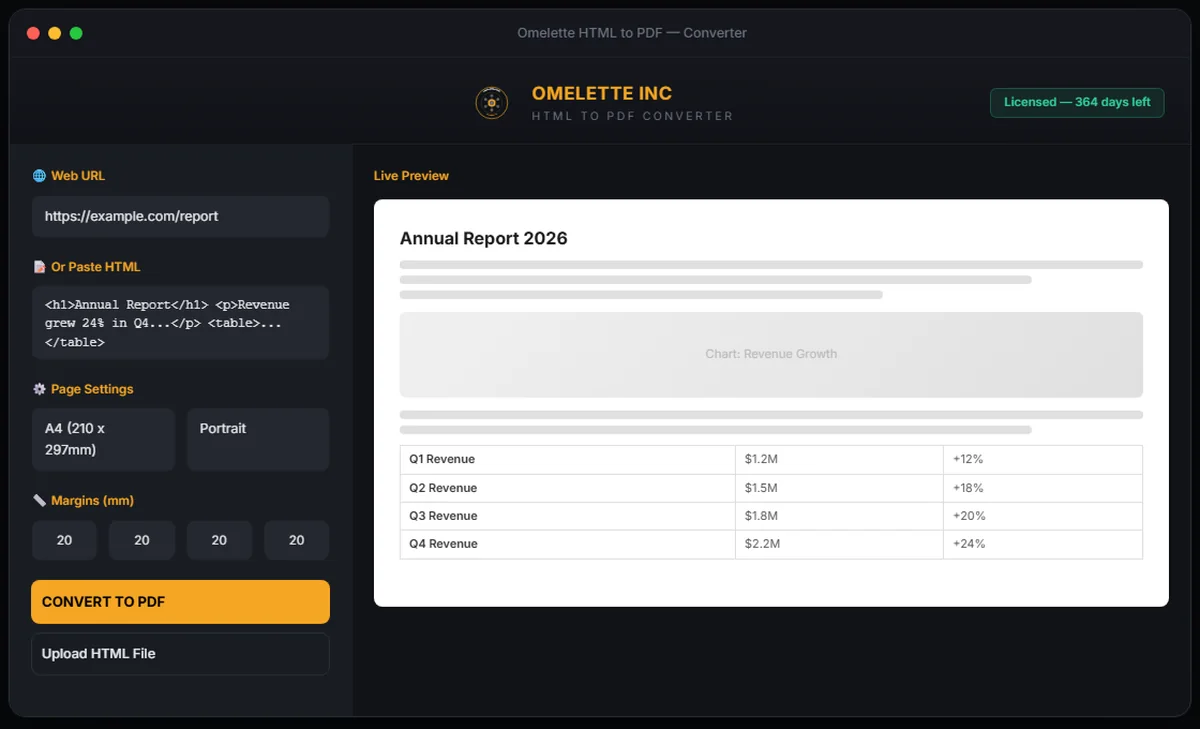
The desktop app that turns any web page, HTML file or raw markup into a beautifully formatted PDF, with a live preview of every page before you convert.
Windows 10+ and macOS 12+. One license works on both.
What's included
URL conversion
- Enter any public or local URL
- Rendered with Chromium's engine for pixel-perfect output
Paste or upload HTML
- Paste raw HTML and CSS, or upload .html files
- Full CSS3 and JavaScript support
Live preview
- See exactly what your PDF will look like
- The preview updates as you type
Page control
- A4, Letter or Legal, in portrait or landscape
- Margins, scale, and custom headers and footers
Print CSS
- Turn background graphics on or off
- Apply print stylesheets and control page breaks
Offline license
- Validated on your machine, no internet needed after activation
- One key works on Windows and Mac
How it works
- Download and install
Run the installer for Windows or Mac. Everything it needs is included.
- Activate
Enter your email and license key. Validation happens offline.
- Convert
Paste a URL, type HTML or upload a file, check the preview, then convert.
What HTML to PDF Converter costs
$99 per year
One plan, full access, both platforms
- Windows and Mac with a single key
- Unlimited PDF conversions
- URL, HTML paste and file upload
- Live preview
- All page sizes, orientations and margins
- Custom headers, footers and print CSS
- Free updates during your license
- Priority email support
Questions about HTML to PDF Converter
Which systems does it run on?
Windows 10 or later and macOS 12 or later. One license covers both.
Do I need to be online?
Only to download it. Your license is validated offline, and local files and pasted HTML convert without a connection. Converting a web page needs that page to be reachable.
How long does a license last?
One year from the date of purchase, with free updates during that time.
Is there a limit on conversions?
No. Conversions are unlimited.